BookingPilot Housekeeping
Skip to content
BookingPilot

Sell everywhere without overselling

One connection keeps Booking.com, Airbnb, Expedia and the rest aligned. Change a price or close a room once and every channel follows.

No extra fee for connectivityUpcoming bookings import on connect

75+ channels through one certified partner, and BookingPilot takes nothing per booking.

BookingPilot
Your desk
Room 12 · €110
Rates, availability, stay rules
Bookings, changes, guest messages
Booking.com
Booking.com
Connected
Airbnb
Airbnb
Connected
Expedia
Expedia
Connected
+72 more
75+
channels through a certified partner
Instant
availability and rate push on every save
5 min
fastest booking import poll
8
direct connect flows in Integrations

Distribution before the connection

What selling on multiple channels costs when each one is its own little kingdom.

01
The 23:47 double booking
The last room sold on two channels at once because neither knew the other existed. Someone gets the apology call in the morning.
One inventory, so the last room sells once
02
A price change, done five times
Weekend rates go up on one extranet, then the next, then the next. One gets forgotten and sells the old price all season.
Set it once, every channel follows
03
Calendar Tetris by hand
OTA bookings copied into the diary one confirmation email at a time, and praying nothing was mistyped.
Bookings import themselves, channel attached

Five little kingdoms today. One connection with BookingPilot.

You push out
Rates and price changes, instantly on save
Availability and room closures
Min-stay and max-stay rules
Room content and bed setup
Channels send back
New reservations, channel attached
Cancellations, applied automatically
Modifications, flagged for your review
Guest messages to the inbox
Your existing upcoming bookings on connect

Connected in four steps

01
Connect a channel once

Enter the property ID or sign in, then map each OTA room-and-rate row to one of your room types.

02
Set the sync rules

Pick a markup over your sell price, choose what pushes and what imports, and set the booking check cadence.

03
Bookings flow both ways

Rates and availability push out instantly on save. New bookings and cancellations come back on the poll you picked.

04
Close a room once

Block it on your calendar and every connected channel stops selling it in the same breath.

Your markup covers their commission

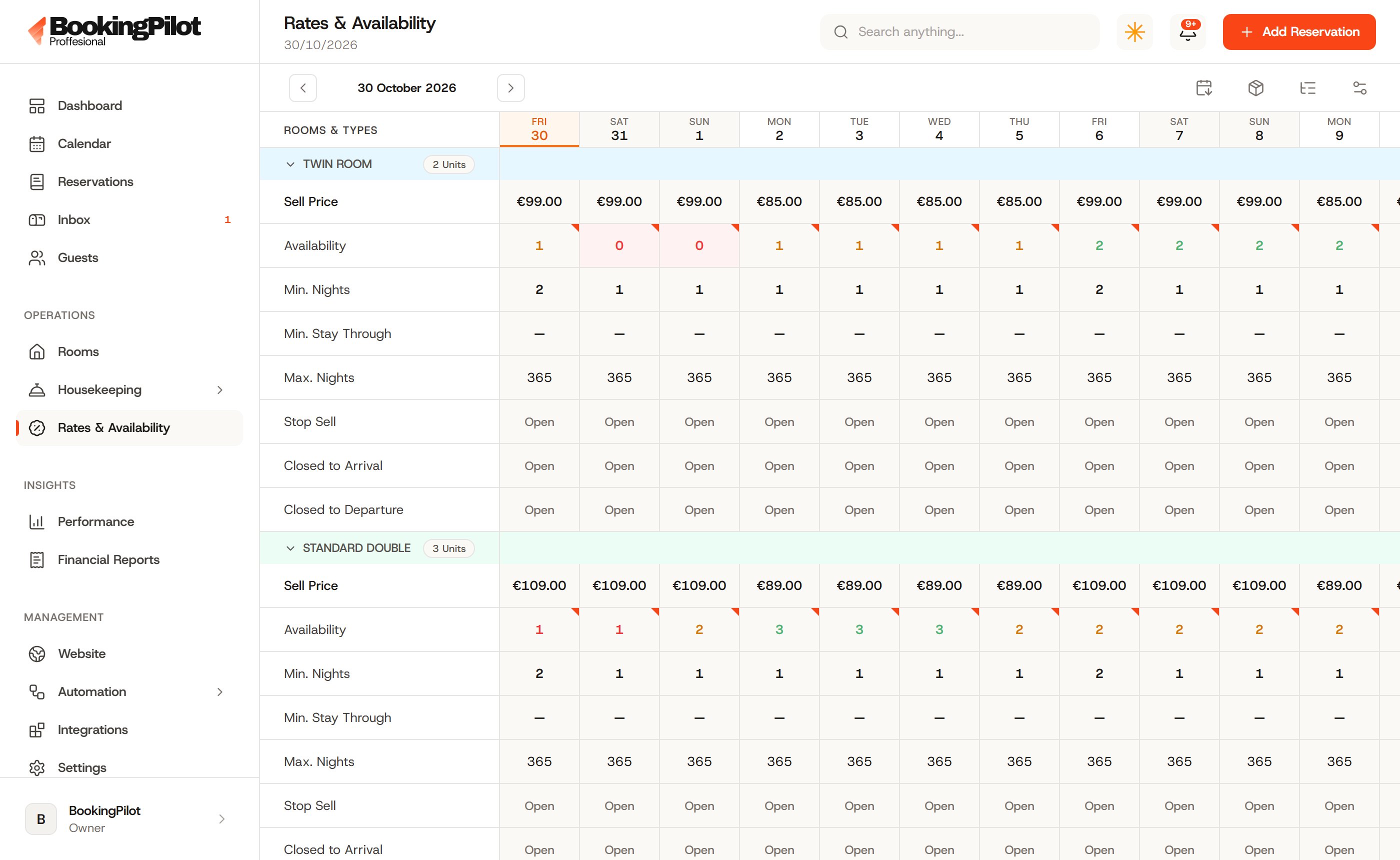
Each connection carries a markup over your sell price, so the channel can take its cut without taking yours. Override any date by hand, or push one price to every channel at once.
Defaults follow the channel norm: Airbnb 12%, Booking.com 15%, Expedia 10%
A negative markup undercuts your direct price where you want it to
Nothing goes live early: staged edits commit on Save, then sync instantly
The rates and availability grid in BookingPilot

What it does

01
Two-way sync, both directions
Rates, availability and restrictions push to every channel
Bookings and cancellations flow back into the same calendar
02
Existing bookings come along
Upcoming reservations import automatically when you connect
The calendar starts full: no manual re-entry, no double-booked first week
03
Each channel gets its price
A markup percentage over your sell price per connection
Per-date overrides on the rate grid, or one price pushed to all
04
Changes get reviewed, not assumed
New bookings and cancellations import automatically
OTA modifications are flagged for your team to review
05
The import poll you control
Real-time every 5 minutes, down to manual only
One setting covers every channel; pushes stay instant regardless
06
Connectivity without the toll
Sync runs through a certified channel partner
BookingPilot takes nothing per booking or per channel

Connects to the channels your guests already book on

Booking.com
Airbnb
Expedia
Agoda
Trip.com
VRBO
Hopper
eDreams
Emerging Travel Group
MakeMyTrip
Traveloka
Despegar
Klook
Hostelworld
Hotel Tonight
HRS
+59 more

Connectivity runs through a certified channel partner. Rates, availability and bookings sync both ways, and you pay BookingPilot nothing extra for it. See integrations

Channels: questions buyers ask

Short, honest answers. The live chat has the long version.

Works with

Same account, same data, nothing to integrate

Connect once. Sell everywhere.

Create your account, add your first property, and see the calendar fill itself.